Microsoft Edge gains yet another advantage over rival Chrome, as users get the option to view two web pages simultaneously in the same tab. For example, you’ll be able to chat on WhatsApp and Messenger in split-screen mode, without switching between tabs or separate windows. Another example would be if you have two Edge windows, each with two websites open in the same tab.
Although almost any recent generation laptop or PC is equipped with widescreen, most web pages are still optimized more for vertical scrolling, limiting the amount of information spread horizontally. Apart from not very successful attempts to modernise websites by moving to so-called Responsive Design, developers of the major web browsers have not been in a hurry to make concrete use of unused display space. So users who want to make more efficient use of the available screen space are forced to open the web browser in multiple windows, in proportion to the number of tabs they want to see at once.
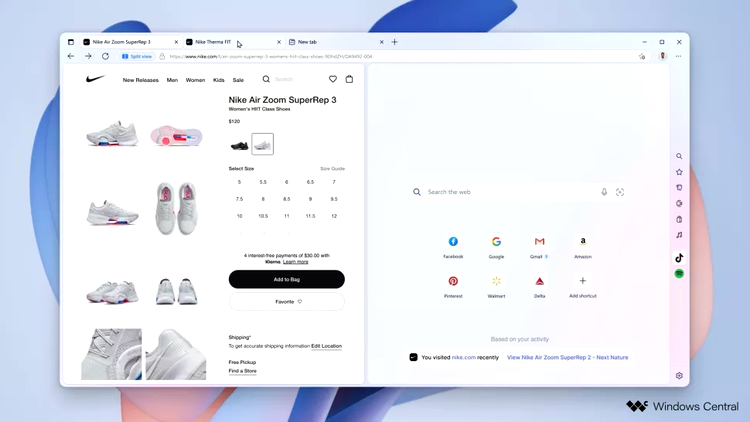
You can activate the new Split View from the hidden setup menu by typing edge://flags in the address bar. Look for the split-screen option and check the Enabled, then restart the application.
As the name implies, Split Screen mode allows you to view two tabs within the same open tab in Microsoft Edge. This way, you’ll be able to use the tab list to switch between pairs of sites viewed in split-screen mode, avoiding the confusion that results from searching for those pages in an already crowded tab list.
Once enabled, the new navigation mode is as easy as clicking on the split-view button added to the right of the address bar. In addition, the right-click menu on any link on the page also displays the option open in split-view, an alternative to opening in a new tab or separate window.
The Best Online Bookmakers April 05 2026
 Bonus€500+ 200 Free spins |
 Bonus€1,000 |
 Bonus€1,000 |
 The SPARC fusion reactor is the infrastructure of the future for the AI era
 Galaxy Tab S10 Lite is really cheap right now
 Why I use a fan in winter and why I especially rely on this model!
 Spotify is increasing its prices again in the USA – what that means for us
 Dead Cells Studio surprises with a roguelite insider tip