Google aims to improve the Chrome browsing experience by adding an improved version of the zoom feature to the mobile app.
Commonly used to improve the readability of web pages rendered on a mobile screen, the zoom feature lets you zoom in on text elements, images, videos and interactive buttons without messing up the page formatting. In its enhanced form, the zoom function will be able to zoom in up to 300%, compared to 200% currently possible.
Apparently, Google engineers have concluded that the current limit is insufficient for the needs of some visually impaired people.
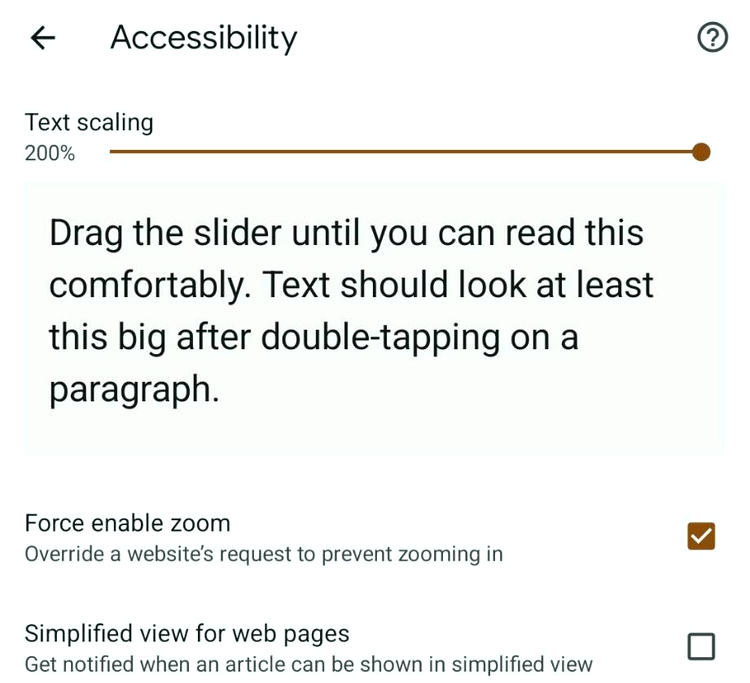
Important to know for Chrome users, the zoom function can also be adjusted on an ad-hoc basis, using two-finger “pinch” commands on the touchscreen interface, or just for scaling the text on the page by adjusting the Text Scaling slider present in the Settings > Accessibility menu. With the latter, the size of images and page formatting is not affected.
Currently in testing, support for text scaling up to 300% of normal size can only be accessed from the Chrome beta.
Also on the enhancements front, Google is also testing a new shortcut for closing Chrome tabs, using a command very similar to the one used to open them.
The Best Online Bookmakers March 18 2026
 Bonus€500+ 200 Free spins |
 Bonus€1,000 |
 Bonus€200 |
 The SPARC fusion reactor is the infrastructure of the future for the AI era
 Galaxy Tab S10 Lite is really cheap right now
 Why I use a fan in winter and why I especially rely on this model!
 Spotify is increasing its prices again in the USA – what that means for us
 Dead Cells Studio surprises with a roguelite insider tip